The internet changes faster than almost any other form of media in human history. Websites are redesigned, articles are deleted, companies disappear, links stop working, and information that was available yesterday may be impossible to find today. This constant change creates a serious problem: how can we preserve the history of the web?
That is where the Wayback Machine becomes incredibly valuable. For researchers, journalists, SEO professionals, students, historians, website owners, and curious internet users, it provides a way to travel back through the history of websites and view snapshots of pages as they appeared in the past.
The Wayback Machine is much more than a simple archive. It is one of the most important digital preservation projects in the world. Whether you want to see what a website looked like ten years ago, recover information from a deleted page, research changes to a company website, or simply explore the early days of the internet, this tool can provide fascinating insights.
In this detailed guide, we will explore what the Wayback Machine is, how it works, why it matters, and how different people can use it effectively.
What Is the Wayback Machine?
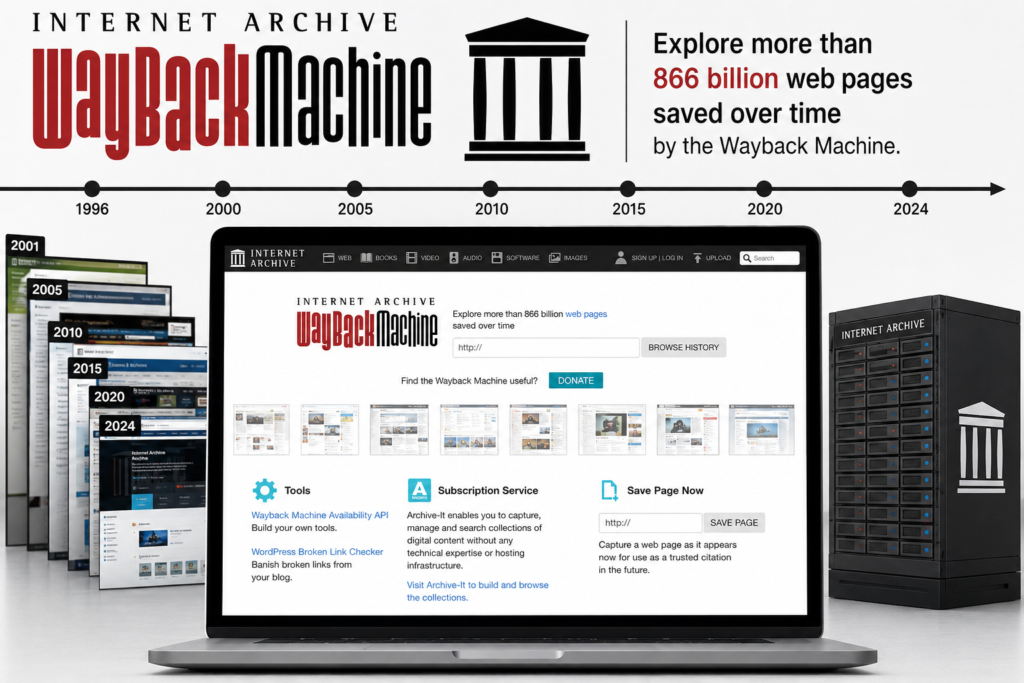
The Wayback Machine is an online digital archive that stores historical versions of websites. It allows users to enter a website address and view archived snapshots of that website from different points in time.
Think of it as a time machine for the internet. Instead of traveling physically into the past, you can visit an older version of a website and see how its pages looked years ago. A website that currently has a completely modern design may have looked entirely different in 2005, 2010, or 2018.
The archive contains snapshots of billions of web pages collected over many years. These snapshots may include text, images, links, layouts, and other elements that were available when the website was archived. However, the exact appearance of a page can vary depending on how completely the page was captured.
For many users, the Wayback Machine is simply an interesting tool for exploring old websites. However, its importance goes far beyond nostalgia. It is widely used for research, journalism, digital preservation, website analysis, legal research, academic work, and SEO investigations.
Why the Wayback Machine Is Important
The internet often feels permanent, but in reality, online information can disappear very quickly. Websites shut down, businesses close, articles are removed, and companies regularly redesign their websites.
Without web archives, much of this information could disappear permanently. The Wayback Machine helps preserve parts of the internet that might otherwise be lost.
This preservation is particularly important for historical research. Modern historians do not only study books, newspapers, and physical documents. A large portion of modern culture, communication, business, and politics now exists online. Websites have become historical documents in their own right.
The Wayback Machine also helps demonstrate how information changes over time. A company’s website may change its policies, products, leadership information, or messaging. Archived versions can help researchers understand what information was previously published.
How the Wayback Machine Works
The basic concept behind the Wayback Machine is relatively simple. Automated systems collect and archive web pages at different points in time.
When a website is archived, a snapshot is created. That snapshot represents how the page appeared when it was captured. Over time, multiple snapshots may be collected.
When a user searches for a website address, the archive displays a timeline or calendar showing available capture dates. Users can then select a specific date and open the archived version.
The quality of an archived page depends on several factors. Some pages are captured almost perfectly, while others may have missing images, broken scripts, unavailable videos, or incomplete formatting.
Modern websites can also be more difficult to archive than older, simpler websites. Many modern platforms rely heavily on JavaScript, dynamic databases, personalized content, and interactive applications. These technologies can make complete preservation more challenging.
Exploring the History of a Website
One of the most interesting uses of the Wayback Machine is exploring how websites have evolved.
Almost every successful website has gone through multiple redesigns. The layouts, logos, navigation systems, colors, and content strategies often change dramatically over time.
Looking at older versions of websites can reveal how internet design trends have changed. Early websites often used simple layouts, small images, bright colors, and basic navigation. Modern websites typically focus on responsive design, mobile compatibility, minimal interfaces, and faster loading experiences.
For businesses, archived websites can also tell the story of a company’s development. You may see when a company introduced a new product, changed its branding, entered a new market, or adjusted its business strategy.
This makes the Wayback Machine a surprisingly useful research tool for understanding the history of companies and online brands.
Using the Wayback Machine for SEO Research
SEO professionals can benefit significantly from archived web data. Search engine optimization is heavily influenced by website structure, content, links, and historical changes.
When analyzing a website, an SEO professional may want to understand how the site looked before a major ranking change. Archived snapshots can provide clues about changes in content strategy, navigation, page structure, or branding.
For example, imagine a website that previously ranked well but experienced a major decline. By comparing older archived versions with the current website, you may discover that important pages were removed or that valuable content disappeared during a redesign.
The Wayback Machine can also help identify historical URLs. This is useful when planning website migrations or recovering old pages. Older versions of a site may reveal pages that no longer exist but could still have backlinks or historical search value.
SEO professionals often use this information when developing redirect strategies, recovering lost content, or investigating broken backlinks.
Recovering Deleted Website Content
One of the most practical uses of the Wayback Machine is recovering information from deleted pages.
Website owners sometimes accidentally delete important content. A page may be removed during a redesign, a migration may fail, or an old backup may no longer be available.
If the page was archived, the Wayback Machine may provide access to an older version. This does not always mean the original page can be recovered perfectly, but it may allow the website owner to retrieve important text, images, headings, or structural information.
This can save a significant amount of time. Instead of recreating an entire page from memory, the archived version can serve as a reference.
However, website owners should not rely on public archives as their only backup system. A proper website backup should include databases, files, media, and other important assets. The Wayback Machine is useful as an additional resource, not as a replacement for professional backups.
The Wayback Machine and Digital Preservation
Digital preservation has become increasingly important because so much of modern life now exists online.
News stories, blogs, company announcements, educational resources, cultural discussions, and public information are often published only on websites.
If those websites disappear, valuable information may disappear with them.
The Wayback Machine contributes to digital preservation by maintaining historical records of publicly accessible web content. This creates opportunities for future researchers to study how the internet developed.
The importance of this work will likely continue to grow. Future historians may study archived websites in the same way historians today study newspapers, letters, magazines, and printed advertisements.
Web archives can reveal how people communicated, what businesses promoted, which technologies were popular, and how society discussed major events.
How Journalists Can Use the Wayback Machine
Journalists often need to verify information that was previously published online.
A public statement may later be removed. A company may update a webpage. A politician, organization, or business may change information that was previously available.
Archived versions can help journalists compare past and present information.
For example, if a company previously described a product in a certain way and later changed the description, archived pages may help document the earlier wording.
However, archived pages should still be used carefully. Journalists should verify dates, sources, and context before presenting archived information as evidence.
A snapshot shows what was captured at a particular time, but users should still consider whether the page was complete and whether the information was accurate when originally published.
Researching Old Businesses and Websites
The Wayback Machine can be particularly useful when researching businesses that no longer exist.
Many companies leave behind very little information after closing. Their websites may disappear, social media accounts may become inactive, and official records may be difficult to locate.
Archived websites can provide valuable details about these businesses.
Researchers may discover information about old products, services, employees, company locations, business models, or marketing campaigns.
This can be useful for historians, journalists, business researchers, and even former customers trying to locate information about discontinued services.
The archive can also be interesting for studying failed internet companies. Looking at their websites may reveal how they presented themselves and how their strategies changed before they disappeared.
The Role of the Wayback Machine in Academic Research
Academic researchers often use archived web content to study modern history and digital culture.
Research topics may include online communication, political messaging, advertising, social movements, technology trends, or changes in public information.
Because websites can change rapidly, archived copies provide a way to preserve information from a specific period.
For example, a researcher studying the development of online education might compare university websites from different years.
A researcher studying marketing trends could examine how major brands changed their advertising messages.
Another researcher might study how news organizations redesigned their websites and adapted to mobile audiences.
These examples demonstrate that web archives are not simply collections of old websites. They can become valuable primary sources for serious research.
Understanding Website Redesigns Through Archived Versions
Website redesigns can significantly change the way a brand communicates with its audience.
A company may move from a traditional design to a minimalist approach. It may change its color scheme, remove pages, simplify navigation, or completely rewrite its content.
The Wayback Machine makes it possible to compare these different stages.
For designers and developers, this can provide useful inspiration. Studying older versions of successful websites can reveal which design ideas survived and which trends disappeared.
It can also help professionals understand the consequences of redesign decisions.
A website migration may appear successful visually while causing serious SEO problems because important URLs or content were removed.
Archived versions make these changes easier to investigate.
The Wayback Machine for Competitive Research
Businesses and marketers can use archived websites to study competitors.
A competitor’s current website only shows its present strategy. An archived website can reveal how that strategy developed over time.
You may discover older product categories, previous marketing messages, discontinued services, or changes in pricing strategies.
This information can help businesses understand how competitors have evolved.
For example, a company may have originally focused on one specific customer group before expanding into a broader market.
Another business may have changed its messaging after launching new products.
By studying archived versions, marketers can gain a more complete understanding of a company’s development.
Can You View Every Website on the Wayback Machine?
No, the Wayback Machine does not contain every page from every website.
Some websites have many archived snapshots, while others have only a few.
Several factors influence whether a page is available. The page may not have been captured, the website may have restricted access, or technical limitations may have prevented complete archiving.
Dynamic websites can also create challenges.
A modern website may load important content from databases or scripts. When an archived version is opened later, some of these elements may no longer function.
As a result, users should not assume that an archived website represents a perfect copy of the original.
It is better to think of the Wayback Machine as a historical snapshot rather than a guaranteed full backup.
Why Some Archived Pages Do Not Work Properly
Users sometimes open an archived page and discover missing images or broken navigation.
This can happen because websites depend on many different resources.
A webpage may load images from another server, retrieve information from an external database, or rely on scripts hosted on different domains.
If those resources were not archived, the page may not function exactly as it originally did.
Interactive features can also be difficult to preserve.
For example, login systems, shopping carts, search forms, live chat tools, and personalized dashboards may not work properly in archived versions.
Despite these limitations, archived pages can still provide valuable information.
Even when a page is incomplete, the visible content may be enough to understand its structure and historical purpose.
The Wayback Machine and Internet Nostalgia
While the Wayback Machine has serious professional and academic uses, it is also a source of entertainment.
Many people use it to revisit websites from their childhood.
Old gaming websites, early blogs, fan pages, forums, and entertainment portals can bring back memories of earlier internet experiences.
The design of older websites is particularly fascinating.
Early internet culture often had a completely different visual style. Websites used animated graphics, colorful backgrounds, decorative text, visitor counters, and other features that are rarely seen today.
Exploring these pages can feel like opening a digital time capsule.
For many users, this nostalgic experience is one of the most enjoyable aspects of the Wayback Machine.
How Website Owners Can Benefit From the Wayback Machine
Website owners can use the archive as a historical record of their own online projects.
If a business has been operating for many years, archived snapshots can demonstrate how the website evolved.
This can be useful when planning a redesign.
Before replacing an old website, the owner can review archived versions to identify valuable pages or content that should not be lost.
The Wayback Machine may also help recover forgotten ideas.
A company may discover an old article, product description, or marketing campaign that could be updated and reused.
For long-running businesses, archived websites can also become part of the company’s brand history.
They demonstrate how the organization grew and adapted to changing technology.
Using the Wayback Machine to Find Old URLs
Old URLs can be extremely valuable, especially for SEO and website migration projects.
When a website changes platforms or redesigns its structure, old pages may disappear.
Some of these pages may still have backlinks from other websites.
If those URLs are not redirected properly, users and search engines may encounter errors.
The Wayback Machine can help identify pages that previously existed.
SEO professionals can search archived versions and create lists of historical URLs.
These URLs can then be analyzed to determine whether they should be redirected, recreated, or permanently retired.
This process can help preserve valuable traffic and reduce the negative impact of website migrations.
The Importance of Checking Historical Context
Archived content should always be viewed within its historical context.
A page from ten years ago may contain information that is no longer accurate.
Technology changes, companies evolve, and public information is updated.
For this reason, users should clearly distinguish between historical information and current information.
An archived product description may explain what a company sold in the past, but it does not necessarily represent what the company sells today.
Similarly, an old company policy may have been replaced by a newer version.
The value of the archive lies partly in showing how information changed.
Researchers should not ignore those changes when interpreting archived content.
Privacy and Ethical Considerations
Web archiving also raises important questions about privacy and ethics.
Information that was publicly available at one point may remain accessible through archived copies even after it is removed from the original website.
This creates a complicated relationship between public information and long-term digital preservation.
Users should approach archived content responsibly.
Just because information is accessible does not automatically mean it should be used without considering context, privacy, or potential harm.
Researchers and journalists should also avoid presenting outdated information as current.
The responsible use of archived information requires careful attention to dates and context.
Limitations of the Wayback Machine
Although the Wayback Machine is extremely useful, it has limitations.
Not every website is archived.
Not every snapshot is complete.
Interactive features may not work.
Images, videos, and scripts may be missing.
In some cases, pages may load slowly or display errors.
These limitations are normal because preserving the entire internet exactly as it exists would be an enormous technical challenge.
The internet is constantly changing.
Millions of pages are created, updated, and deleted.
Web technologies are also becoming more complex.
Despite these challenges, the archive remains one of the most impressive digital preservation projects available to the public.
Tips for Using the Wayback Machine Effectively
The first important tip is to try different dates.
If one snapshot does not load properly, another snapshot from a nearby date may contain more complete information.
Older websites may also have different URLs.
If you cannot find a specific page, try searching the main domain and exploring archived navigation links.
Another useful strategy is to compare multiple versions.
Looking at a website across several years can reveal important changes that would not be obvious from a single snapshot.
For professional research, it is also a good idea to record the date of the archived version you are using.
This helps maintain accuracy and makes it easier to verify historical information later.
The Future of Web Archiving
The future of web archiving will likely become even more important as society becomes increasingly dependent on digital information.
More businesses, governments, schools, media organizations, and communities now publish information online.
If this information is not preserved, future generations may lose access to important parts of modern history.
At the same time, web archiving will become more technically challenging.
Modern websites increasingly rely on interactive applications, artificial intelligence, personalized content, cloud services, and complex scripts.
Preserving these experiences will require new technologies and improved archiving methods.
Despite these challenges, the basic mission remains clear: important parts of the digital world should not disappear simply because websites change or technology evolves.
Final Thoughts on the Wayback Machine
The Wayback Machine is one of the internet’s most fascinating and useful tools.
For casual users, it offers a chance to revisit the past and explore websites that no longer exist in their original form.
For professionals, it provides valuable information for research, journalism, SEO, business analysis, and website recovery.
Its greatest value may be its role in digital preservation.
The internet has become a major part of human history, culture, and communication. Preserving parts of that history is essential.
The Wayback Machine gives users the ability to look beyond the current version of the web.
It reminds us that websites have histories, businesses evolve, information changes, and the internet itself has a past worth preserving.
Whether you are investigating an old website, recovering deleted content, researching a competitor, analyzing SEO history, or simply feeling nostalgic about the early internet, the Wayback Machine offers a unique window into the digital past.
In a world where online content can disappear with a single update or deleted page, having access to historical snapshots is incredibly valuable. The Wayback Machine is not perfect, and it cannot preserve every part of the internet, but its contribution to digital history is difficult to overstate.
For anyone who works online or simply wants to understand how the web has changed over time, learning how to use the Wayback Machine is well worth the effort. It turns the internet from a constantly changing stream of information into something that can also be explored historically—one archived snapshot at a time.
YOU MAY HAVE MISSED