Introduction
Technology is changing the way people read, learn, and interact with information. Traditional reading usually involves looking at printed words on a page or reading digital content on a screen. However, modern technology has introduced new ways to experience information, including augmented reality (AR). One interesting concept in this area is the augmented reality reader, a technology that combines traditional reading experiences with interactive digital elements.
An augmented reality reader allows users to experience information beyond ordinary text. Instead of simply reading words, users can interact with digital objects, animations, images, audio, and additional information that appear within their real-world surroundings. This creates a more engaging experience, particularly for students, educators, researchers, and people who enjoy exploring digital content.
The growing interest in augmented reality has encouraged developers to explore new ways of combining reading materials with immersive technology. AR-enabled books, educational applications, interactive documents, and mobile reading experiences are all examples of how this technology can change the relationship between readers and information.
Let’s go through everything worth knowing about augmented reality readers, including how they work, their features, practical applications, benefits, limitations, and what their future might look like.
What Is an Augmented Reality Reader?
An augmented reality reader is a digital reading experience or application that uses augmented reality technology to add interactive digital content to the physical environment. It allows readers to access information through a combination of traditional text and computer-generated elements. These elements may include 3D models, animations, videos, sound effects, labels, and interactive graphics.
Unlike an ordinary e-book reader, which mainly displays text and images on a screen, an AR reader can connect digital information with real-world objects or printed materials. For example, a student reading about the solar system might point a compatible smartphone at a page in an educational book and see a three-dimensional representation of the planets. The student can then explore the model from different angles and interact with individual planets.
The concept is not limited to educational books. An augmented reality reader can also support product manuals, technical documents, interactive magazines, museum guides, language-learning materials, and other types of information. Its main purpose is to make reading more interactive and help users understand information through multiple forms of media.
It is important to understand that augmented reality readers are not necessarily one specific application or device. The term can describe different software solutions and reading systems that use AR technology to enhance the presentation of information.
How Does an Augmented Reality Reader Work?
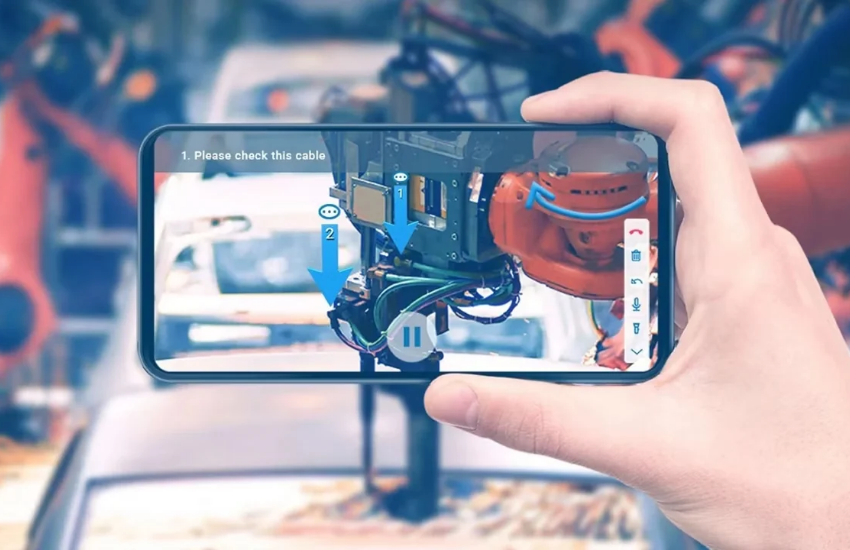
An augmented reality reader works by combining information from the real world with digital content. It generally uses a camera, software, tracking technology, and a display to recognize the user’s environment and place virtual elements within it.
The process often begins when someone opens an AR-enabled application on a smartphone, tablet, or compatible headset. The device’s camera captures the surroundings, while the application analyzes the visual information to identify a particular image, object, surface, or location.
Once the software recognizes the required reference point, it displays the related digital content. This content might be a 3D animation, an explanatory label, a video, or an interactive object. The reader can then move the device, select available controls, or explore the information in greater detail.
For example, an illustrated history book could contain special images that activate additional digital scenes. When a reader scans one of those images, the application might display a historical building or an animated representation of an important event. The printed page remains the foundation of the reading experience, while augmented reality adds another layer of information.
Key Features of an Augmented Reality Reader
Augmented reality readers offer several features that separate them from conventional reading applications. Although the available features depend on the software and device, most AR reading experiences focus on making information easier to explore, understand, and interact with.
Some of the most common features include:
- 3D visual content: Readers can view three-dimensional objects that represent information discussed in a book or document.
- Interactive animations: Certain illustrations can move or respond to user actions, making stories and educational materials more engaging.
- Audio narration: Applications can provide spoken explanations, character voices, pronunciation guides, and background sounds.
- Image recognition: The software can recognize selected images or printed markers and display related digital content.
- Real-time interaction: Users can move their devices, rotate virtual objects, and explore digital information from different perspectives.
- Additional learning materials: Some applications provide quizzes, definitions, explanations, and supplementary educational resources.
- Multilingual support: Depending on the application, users may be able to access translations, subtitles, or pronunciation assistance.
These features make augmented reality reading more flexible than a standard digital reading experience. Instead of presenting every piece of information in the same format, AR applications can combine several types of media to explain different subjects.
However, good design is essential. Adding animations and visual effects does not automatically make reading better. The digital features should support the original content instead of distracting readers from the information they are trying to understand.
Different Types of Augmented Reality Readers
Augmented reality readers can be divided into several categories based on how they recognize the environment and present digital information. Understanding these categories helps explain the different ways AR technology can be used for reading.
1. Marker-Based AR Readers
Marker-based augmented reality readers use specific visual references to activate digital content. These references might be printed illustrations, symbols, photographs, or specially designed patterns included in books and educational materials.
When a reader points a compatible device toward the marker, the application recognizes the image and displays the corresponding digital information. For example, scanning a picture of a dinosaur in an educational book might display an animated dinosaur model with additional information about its size, habitat, and behavior.
This approach is particularly useful for children’s books, interactive learning materials, and printed educational resources. Since the digital content is connected to specific images, readers can easily understand which virtual elements belong to which sections of the material.
2. Markerless AR Readers
Markerless AR readers do not require specially printed symbols or reference images to display digital content. Instead, they use technologies such as environmental tracking, computer vision, and spatial understanding to recognize surfaces and positions in the surrounding environment.
For example, someone reading an educational document about architecture might use an AR application to place a virtual building model on a desk. The reader can then explore its structure while continuing to study the written explanation.
This approach offers more flexibility because users are not restricted to scanning specific printed images. However, its performance depends on the capabilities of the device, the application, and the surrounding environment.
3. Image Recognition-Based Readers
Image recognition-based readers identify particular photographs, illustrations, or objects and connect them with digital information. They can be useful when printed materials contain recognizable visual content that can serve as a starting point for an augmented experience.
Imagine reading a travel magazine that includes photographs of famous destinations. By scanning a supported photograph, a reader could access additional information about the location, view a related animation, or explore a virtual representation of a landmark.
This type of reading technology can make magazines, catalogs, educational publications, and promotional materials more interactive. It also gives publishers an opportunity to add digital information without completely changing the original printed layout.
4. Location-Based AR Readers
Location-based augmented reality readers use geographical information and device sensors to display relevant content according to the user’s location. They can combine reading materials with information connected to real-world places.
For example, a visitor exploring a historical city might use an AR guide to read about a building while standing near it. The application could display historical descriptions, architectural details, and additional educational information.
This technology can be particularly useful for museums, cultural attractions, historical tours, and outdoor learning activities. It connects written information with the physical places being discussed, creating a more contextual reading experience.
Benefits of Using an Augmented Reality Reader
One of the biggest advantages of augmented reality reading is that it gives users more ways to interact with information. Traditional books and digital documents remain valuable, but AR technology introduces additional opportunities to explore subjects visually and practically.
Instead of relying entirely on written descriptions, readers can use animations, interactive objects, and audio explanations to understand difficult topics. This can be especially helpful when the material involves complicated structures, unfamiliar environments, or processes that are difficult to explain through words alone.
Another important benefit is flexibility. AR readers can support different learning preferences by combining text, images, sound, and interaction. Readers can explore additional information when needed while continuing to use the original material as their main source of knowledge.
1. Makes Reading More Engaging
Keeping readers interested is an important part of any reading experience. Some people enjoy traditional books, while others prefer digital content that includes interactive features. Augmented reality provides a way to bring these experiences together.
For example, an illustrated storybook can become more interactive when its characters appear as animated digital objects. Children can watch a scene develop while following the written story, making the experience more visually interesting.
This can also encourage readers to revisit educational materials. When the digital elements are meaningfully connected to the content, readers may become more interested in exploring additional chapters and related subjects.
2. Helps Explain Complex Information
Certain subjects are difficult to understand through written explanations alone. Science, engineering, geography, biology, and architecture often involve concepts that become easier to understand when readers can see how different elements are connected.
An augmented reality reader can present a digital model alongside the written explanation. A student studying the human body, for example, could explore a virtual representation of an organ while reading about its structure and function.
This approach can help connect abstract information with visual examples. However, AR should complement accurate explanations rather than replace detailed reading, classroom instruction, or practical experience.
3. Supports Interactive Learning
Augmented reality reading can transform passive information consumption into a more active experience. Readers do not always have to move from one paragraph to another without interacting with the material.
Some applications allow users to answer questions, explore objects, select different information layers, and complete small learning activities. These features can encourage curiosity and give readers more control over how they explore a subject.
Interactive learning can also help educators introduce activities that involve discussion and collaboration. Students may compare what they discover, explain digital models to classmates, and discuss how the visual information relates to the written material.
4. Connects Physical and Digital Reading
Many people appreciate physical books because they offer a familiar reading experience. At the same time, digital technology provides convenience, multimedia content, and access to additional resources.
An augmented reality reader can combine these advantages. A printed book remains available for ordinary reading, while compatible digital features provide extra information when required.
This combination can be particularly useful for educational publishers. They can preserve the structure and appearance of traditional books while adding interactive material that readers can access through compatible devices.
5. Encourages Independent Exploration
AR readers can give users the opportunity to explore information at their own pace. Rather than depending entirely on a teacher or instructor to explain every detail, readers may be able to access additional explanations through the application.
For example, someone studying a geographical map could select different locations to learn about their environments, populations, and historical importance. This type of exploration allows users to follow their interests while remaining connected to the main topic.
Independent exploration is valuable when the application presents accurate information and provides clear instructions. It should encourage curiosity without making users feel overwhelmed by unnecessary features.
Augmented Reality Reader Applications in Education
Education is one of the most promising areas for augmented reality reading technology. Schools, universities, training centers, and educational publishers can use AR-supported materials to present information in more interactive ways.
Traditional educational materials are often designed around written explanations, diagrams, and photographs. These methods remain important, but certain subjects benefit from additional visual demonstrations. AR provides an opportunity to connect textbook information with digital models and interactive learning activities.
Research published in Frontiers in Psychology in 2024 examined the experiences of 38 children aged eight to ten who used an augmented reality book. The study explored different aspects of reading engagement, including behavioral, cognitive, emotional, and social experiences. Its findings offer useful insights into how children interact with this type of reading material. PMC+1
Augmented Reality in School Textbooks
School textbooks can become more interactive through AR technology. Instead of relying exclusively on static diagrams, students can use compatible devices to explore virtual representations of subjects discussed in their lessons.
For example, a science textbook might include an illustration of the solar system. Scanning the page could display a three-dimensional model of the planets, allowing students to explore their positions and understand their relative movements.
Geography textbooks could also benefit from AR features. Students might explore virtual landscapes, mountain formations, rivers, and geographical structures while reading the related explanations. These experiences can help make classroom subjects more accessible and interesting.
Language Learning and Vocabulary Development
Learning a new language requires repeated exposure to vocabulary, pronunciation, sentence structure, and practical communication. An augmented reality reader can support these activities by connecting written words with audio and visual information.
For instance, a language-learning book could include illustrations of common objects. When a student scans an image, the application might display the object’s name, play its pronunciation, and provide a simple example sentence.
This approach can help learners connect written vocabulary with recognizable objects and sounds. It can also provide additional practice opportunities outside the classroom, although regular reading, listening, speaking, and writing remain essential for developing language skills.
Science and Technical Education
Science education frequently involves subjects that are difficult to visualize. Microscopic structures, chemical reactions, mechanical systems, and biological processes are not always easy to understand through ordinary illustrations.
An AR reader can provide digital representations that allow students to explore these subjects from different perspectives. For example, a chemistry learning application might show a molecular structure alongside a written explanation of its components.
Technical education can also benefit from interactive reading materials. Students studying engineering or electronics might use AR-supported manuals to explore virtual components and understand how different parts fit together.
Augmented Reality Readers for Children
Children are among the audiences who may benefit from carefully designed augmented reality reading experiences. Younger readers often respond positively to illustrations, storytelling, sound, and activities that encourage them to explore information.
An AR storybook can present familiar reading material while introducing additional digital elements. Characters might appear as animated objects, environments could become interactive, and selected pages could include audio narration or simple questions.
These features can make storytelling more engaging, particularly for children who enjoy visual and interactive activities. They can also create opportunities for parents and teachers to discuss stories with young readers.
However, the quality of the experience matters more than the number of digital effects. A useful AR book should encourage children to understand the story rather than simply focus on watching animations. Research on children’s AR books has highlighted the importance of thoughtful design and meaningful connections between digital features and written content. PMC+1
Supporting Early Reading Skills
Early reading development involves recognizing letters, understanding words, connecting sounds with written language, and gradually building comprehension skills. AR applications can support these activities through additional visual and audio resources.
For example, a beginner’s reading book might allow children to scan an illustrated word and hear its pronunciation. A simple animation could demonstrate the meaning of the word, helping children connect language with recognizable objects.
Such features may be helpful for children who need additional practice. Nevertheless, they should be used alongside ordinary reading exercises, conversations, and age-appropriate educational activities.
Making Storytelling More Interactive
Storytelling becomes different when readers can explore selected parts of a story through digital content. Instead of imagining every scene from written descriptions, children may be able to view additional visual representations.
An AR storybook might show an animated forest, a moving character, or a virtual environment related to the story. These elements can help readers follow the narrative and encourage conversations about what is happening.
The most successful storytelling experiences maintain a balance between imagination and technology. Children should still have opportunities to interpret the story, imagine characters, and understand the meaning of the written words.
Encouraging Shared Reading Experiences
Reading does not always have to be an individual activity. Parents, teachers, and children can explore AR-enabled books together, discussing the characters, illustrations, and additional information.
For example, a parent and child might scan an illustration and talk about the digital object displayed on the screen. They could discuss its appearance, compare it with real-world examples, and connect it with the story.
Shared reading can make technology more meaningful because adults can guide children toward understanding the content. It also creates opportunities for conversation and collaboration rather than allowing the application to become the main focus.
How Augmented Reality Readers Are Used in Different Industries
Although education is an important application, augmented reality reading technology is not limited to schools or children’s books. Different industries can use AR-supported documents to provide information in ways that connect digital explanations with real-world environments.
The technology can be particularly useful when people need to understand instructions, identify objects, or access additional details while looking at something in front of them. This creates opportunities for publishers, businesses, museums, and professional training organizations.
Here are some important industries where augmented reality readers can provide practical value.
1. Publishing and Digital Media
The publishing industry can use augmented reality to create a different experience for readers. Traditional books, newspapers, magazines, and catalogs can include digital features that provide additional information beyond the printed page.
For example, a travel magazine could allow readers to explore virtual representations of destinations featured in its articles. A science publication might include animated diagrams that demonstrate how a particular process works.
Publishers can also use AR to make educational publications more interactive. The important consideration is ensuring that additional digital content provides genuine value instead of simply adding visual effects.
2. Museums and Historical Education
Museums contain valuable information about historical events, cultural traditions, scientific discoveries, and artistic achievements. However, visitors sometimes need additional explanations to understand the importance of particular exhibits.
An augmented reality reader can provide digital descriptions, historical context, and interactive information when visitors scan an exhibit or a printed museum guide.
For example, someone exploring an ancient artifact might access a digital explanation showing how the object was originally used. A historical exhibition could provide additional information about a particular period through photographs, animations, and written descriptions.
3. Healthcare and Medical Education
Healthcare professionals and medical students regularly work with complicated educational materials. Medical textbooks contain detailed information about anatomy, diseases, medical procedures, and different body systems.
AR-supported reading applications could help students explore virtual anatomical models while studying the corresponding written explanations. They might rotate a model, examine different structures, and access labels describing individual components.
Medical training materials could also use augmented reality to demonstrate the arrangement of equipment or explain technical procedures. Such applications should always rely on professionally reviewed information and should not replace clinical supervision or established medical guidance.
4. Manufacturing and Technical Training
Manufacturing companies often provide employees with technical documents, equipment instructions, and maintenance manuals. Understanding these materials can sometimes require additional demonstrations.
An augmented reality reader could connect written instructions with digital representations of machinery or components. A technician might scan a supported diagram to access an interactive explanation of how a particular part operates.
This approach could help employees understand complicated systems and locate relevant information more efficiently. However, safety-critical instructions must remain clear, accurate, and professionally validated.
5. Tourism and Travel
Travelers often use guidebooks, maps, and digital articles to learn about unfamiliar destinations. Augmented reality can add another layer to this experience by connecting written information with real-world locations.
A visitor reading about a historical monument could access additional information while standing near the structure. A compatible application might display historical photographs, architectural details, or translations of important descriptions.
This combination of reading and location-based information can make travel guides more informative. It also gives visitors a way to explore destinations at their own pace.
Accessibility and Inclusive Reading Experiences
Accessibility is an important consideration when developing any digital reading technology. Not every reader interacts with information in the same way, and a useful augmented reality reader should accommodate different needs whenever possible.
Features such as audio narration, adjustable text sizes, captions, translations, and alternative descriptions can make reading materials more accessible. For example, someone who finds small printed text difficult to read might benefit from a digital version with adjustable typography.
Audio support can also help readers who are learning a language or need assistance with pronunciation. When combined with clearly written explanations, these features can create a more flexible reading environment.
However, augmented reality does not automatically make content accessible. Some applications require users to hold a device steadily, move around an environment, or interact with small controls. Developers should consider these challenges and provide alternative ways to access the same information.
Augmented Reality Reader vs. Traditional E-Book Reader
An augmented reality reader and a traditional e-book reader both provide digital reading experiences, but they serve slightly different purposes. Understanding the difference can help readers decide which technology is appropriate for their needs.
A conventional e-book reader focuses on displaying digital text and images. It may offer useful features such as bookmarks, adjustable fonts, search functions, highlighting, and offline reading.
An AR reader adds another layer of interaction. It can display digital content within a real-world environment or connect virtual elements with printed materials. Depending on the application, this may include three-dimensional models, animations, audio, and interactive educational features.
Here is a simple comparison:
| Feature | Traditional E-book Reader | Augmented Reality Reader |
|---|---|---|
| Main purpose | Digital reading | Enhanced interactive reading |
| Text display | Yes | Yes |
| 3D models | Usually limited | Supported by compatible applications |
| Animations | Application dependent | Common in AR experiences |
| Audio support | Often available | Available in many applications |
| Real-world interaction | Limited | A central AR capability |
| Device requirements | E-reader, phone, or tablet | Compatible phone, tablet, or headset |
| Learning activities | Text-based and multimedia | Can include spatial and interactive activities |
Neither technology is automatically better than the other. Traditional e-book readers are convenient for long reading sessions, novels, articles, and documents. Augmented reality readers can be more useful when visual demonstrations and interactive explanations add value to the material.
In many situations, combining both approaches can provide a balanced reading experience.
Devices Needed to Use an Augmented Reality Reader
One reason augmented reality reading is becoming more accessible is that users do not always need specialized equipment. Many AR experiences can work through devices that people already own.
However, the exact requirements depend on the application and the type of augmented reality features being used.
Smartphones
Smartphones are among the most convenient devices for accessing AR reading experiences. Their cameras, displays, processors, and motion sensors can support applications that recognize images and display digital objects.
A user might download an AR reading application, open a supported book, and point the smartphone camera toward a particular page. If the application recognizes the required image, it can display the associated digital content.
Smartphones are portable and familiar to many users, making them a practical starting point for exploring augmented reality reading.
Tablets
Tablets offer a larger display than most smartphones, which can make them useful for educational reading and interactive demonstrations.
Students can place a tablet above a printed book and explore digital models while keeping the written information visible. The larger screen can also make certain diagrams and animations easier to examine.
Schools and training centers may find tablets useful because they can support group demonstrations and supervised learning activities.
AR Headsets and Smart Glasses
Some augmented reality systems use specialized headsets or smart glasses to display digital information within the user’s field of view.
These devices can create more immersive experiences because users do not always need to hold a smartphone in front of them. Depending on the hardware, virtual labels, instructions, and other digital elements may appear while the user looks at real-world objects.
However, specialized AR hardware can be more expensive and may require additional setup. For ordinary reading activities, a compatible smartphone or tablet is often sufficient.
Challenges and Limitations of Augmented Reality Readers
Despite their potential, augmented reality readers have limitations that developers, educators, and users should understand. The technology is useful in certain situations, but it is not a perfect replacement for traditional reading methods.
A balanced approach is important because the success of an AR reading experience depends on the quality of its content, software, hardware, and overall design.
1. Device Compatibility
Not every smartphone, tablet, or computer supports every augmented reality application. Some experiences require particular operating system versions, camera capabilities, processing power, or AR software frameworks.
This can create difficulties for users with older devices. A book might advertise interactive features, but those features may not work properly on every device.
Developers should provide clear compatibility information before users purchase AR-supported reading materials. They should also consider simpler alternatives for people who cannot access the required technology.
2. Internet and Connectivity Requirements
Some AR reading applications download digital content directly from online servers. This means users may need a stable internet connection to access animations, videos, or additional learning materials.
Connectivity can become a problem in schools, rural locations, and places where mobile internet is unreliable. Large multimedia files can also consume significant amounts of data.
Offline functionality can help solve this issue. Applications that allow users to download required content in advance can provide a more dependable experience when an internet connection is unavailable.
3. Distractions During Reading
One of the biggest challenges is maintaining a balance between digital interaction and traditional reading. Too many animations, sounds, and interactive features can distract users from the actual content.
For example, a child might become more interested in repeatedly playing an animation than understanding the story. Similarly, a student may spend too much time exploring virtual objects without reading the accompanying explanations.
Developers should design AR features around the purpose of the reading material. Interactive elements should help readers understand the subject rather than compete with the written content.
4. Development Costs
Creating an augmented reality reading application can require considerable time, technical knowledge, and financial resources. Developers may need to produce 3D models, animations, audio recordings, interactive interfaces, and image recognition systems.
Publishers must also consider the cost of maintaining the application and updating its content. A printed book can remain useful for years, but its connected digital features may require software updates and technical support.
These expenses can make AR publishing more challenging for smaller educational organizations and independent authors.
5. Privacy and Data Protection
AR applications may request access to device cameras, motion sensors, location information, or other permissions. Some applications may also collect usage information to improve their services.
Users should understand what information an application collects and why it needs particular permissions. Camera access should be especially carefully managed when children are using AR reading applications.
Parents, schools, and organizations should review privacy policies before adopting these tools. Developers should collect only the information necessary to provide the service and should protect any personal data they handle.
6. Screen Time and Physical Comfort
Augmented reality reading usually involves looking at a digital display while interacting with printed or real-world materials. Extended sessions may cause eye fatigue or discomfort for some users.
Children may also need guidance about balancing digital activities with outdoor play, physical activities, and ordinary reading. Taking breaks and using devices in comfortable lighting conditions can help make the experience more manageable.
AR should be treated as one reading option among several rather than a reason to spend every reading session looking at a screen.
How to Choose the Right Augmented Reality Reader
Choosing an augmented reality reader depends on what you want to achieve. A student looking for interactive textbooks may need different features from a professional who wants to explore technical documents or a parent searching for an engaging storybook.
Before selecting an application, consider the type of reading material you use, the devices you own, and the additional features that would genuinely improve your experience.
Here are some important factors to consider.
Check Device Compatibility
Start by checking whether the application works with your smartphone, tablet, or AR headset. Review its operating system requirements and supported hardware before downloading or purchasing anything.
Some applications support a wide range of devices, while others require specific AR capabilities. Checking compatibility beforehand can save time and prevent unnecessary expenses.
Look for Easy Navigation
A good augmented reality reader should have a simple interface. Users should be able to open reading materials, scan supported images, and access additional information without complicated instructions.
This is particularly important for younger readers and people who are new to augmented reality. Clear menus, understandable controls, and helpful tutorials can make the experience much easier.
Evaluate Content Quality
The quality of the digital content is more important than the number of available animations. Look for applications that provide accurate explanations, useful visual demonstrations, and interactive elements that connect directly with the reading material.
If an application is designed for education, check whether its information comes from reliable educational sources. A visually impressive experience is not necessarily an educationally valuable one.
Review Privacy and Security
Before installing an AR reader, examine its permissions and privacy information. Determine whether it needs camera access, location information, or an account to provide its features.
For children, parental guidance and appropriate privacy controls are especially important. Choose applications that explain their data practices clearly and avoid unnecessary information collection.
Consider Offline Features
Offline access can be valuable for students and readers who do not always have reliable internet access. Some applications allow users to download reading materials and related digital content for later use.
If you regularly read while traveling or in locations with limited connectivity, offline functionality should be one of your selection priorities.
The Future of Augmented Reality Readers
The future of augmented reality reading looks interesting because digital technology continues to create new opportunities for presenting information. As mobile hardware, computer vision, and interactive software improve, AR readers may become more practical for everyday educational and professional activities.
One possible development is the integration of artificial intelligence with augmented reality. AI-powered reading applications could potentially provide explanations, summarize difficult passages, translate selected words, and answer questions while readers explore digital content.
Another possibility is the development of more advanced interactive books. Instead of simply displaying a three-dimensional object, future applications may allow readers to explore complex simulations and receive information based on their individual interests.
Wearable AR devices may also influence how people interact with written information. If smart glasses become more comfortable and affordable, users could eventually access contextual explanations without constantly holding a smartphone or tablet.
However, technological progress alone will not determine the success of AR readers. Content quality, accessibility, affordability, privacy, and practical usefulness will remain important factors. The most successful applications will likely be those that make reading easier and more meaningful rather than adding unnecessary complexity.
Augmented Reality Readers and Artificial Intelligence
Artificial intelligence and augmented reality are two different technologies, but they can complement each other in a reading application.
AI can help analyze written content, recognize language, generate explanations, and organize information. AR can then present selected information through digital objects, labels, and interactive visual elements.
For example, imagine reading a technical document about a mechanical system. An AI-supported AR application could potentially identify a particular component, explain its purpose, and display a corresponding digital model. This could make complicated technical information easier to explore.
Language learning is another area where these technologies could work together. An application might recognize a printed word, provide its translation, play its pronunciation, and display a related visual example.
Nevertheless, AI-generated information must be checked for accuracy. Developers should also make it clear when information is generated automatically and provide ways to verify important explanations.
Is an Augmented Reality Reader Worth Using?
Whether an augmented reality reader is worth using depends on your reading habits and personal requirements. If you mainly read novels, news articles, or lengthy documents, a conventional book or e-reader may already provide everything you need.
However, if you regularly study subjects that involve complicated diagrams, physical objects, technical processes, or visual explanations, AR reading can offer additional value. It gives readers another way to explore information and connect written explanations with digital demonstrations.
Students, teachers, educational publishers, and people interested in interactive learning may find the technology particularly useful. Parents may also appreciate AR storybooks when the interactive features support meaningful reading activities.
The best approach is to use augmented reality when it improves the material. Traditional reading remains important, and there is no reason to replace a useful book with a more complicated digital experience simply because the technology is available.
Frequently Asked Questions (FAQs)
1. What is an augmented reality reader?
An augmented reality reader is an application or digital reading system that combines written information with interactive digital elements. It can display animations, 3D objects, audio, and additional explanations through compatible devices.
Its purpose is to enhance traditional reading by providing more ways to explore and understand information.
2. How does an augmented reality reader work?
An AR reader generally uses a device’s camera, sensors, and specialized software to recognize images, objects, or surfaces. After identifying the required reference point, it displays related digital content on the device’s screen or through a compatible headset.
Users can interact with the content by moving their devices, selecting objects, or exploring available controls.
3. Do I need a special device to use an augmented reality reader?
Not necessarily. Many AR reading applications work with compatible smartphones and tablets.
However, certain advanced experiences require specialized hardware or particular device capabilities. It is always worth checking the application’s technical requirements before installing it.
4. Can augmented reality readers help students?
Yes. AR readers can support educational activities by presenting visual demonstrations, interactive diagrams, audio explanations, and additional learning materials.
They may be particularly useful for subjects involving complex structures and concepts. However, their effectiveness depends on the quality of the educational content and how the technology is incorporated into learning activities.
5. Are augmented reality readers suitable for children?
Many AR reading experiences are designed specifically for children. Interactive storybooks, animated illustrations, pronunciation support, and educational activities can make reading more engaging.
Parents and teachers should choose age-appropriate applications and make sure digital features support the story rather than distract children from reading.
6. What is the difference between augmented reality and virtual reality reading?
Augmented reality adds digital information to the real-world environment. For example, an AR reader might display an animated object over a printed book.
Virtual reality creates a computer-generated environment that users experience through compatible VR equipment. AR combines physical and digital elements, while VR generally places users inside a virtual environment.
7. Can an augmented reality reader work without the internet?
Some applications support offline reading, while others require an internet connection to download or display digital content.
Applications with downloadable resources are particularly useful for users who want to access AR materials without relying on continuous connectivity.
8. Are augmented reality readers expensive?
The cost depends on the application, reading materials, and hardware requirements. Some AR reading applications may be free, while others offer paid features or require specially designed books.
Smartphones and tablets can also be used for many AR experiences, so purchasing a specialized headset is not always necessary.
9. Can augmented reality readers support language learning?
Yes. AR reading applications can combine written vocabulary with audio pronunciation, translations, visual examples, and interactive exercises.
These features can support vocabulary development and help learners connect written words with their meanings. They work best when combined with regular speaking, listening, writing, and reading practice.
10. What is the future of augmented reality reading technology?
Future AR readers may include more advanced AI assistance, improved 3D demonstrations, personalized learning experiences, and wearable display technology.
As these technologies develop, readers may gain new ways to explore information. However, accessibility, privacy, affordability, and content quality will remain essential considerations.
Conclusion
Augmented reality readers represent an interesting development in the world of digital reading. By combining traditional written information with interactive digital elements, they provide new opportunities to explore books, educational materials, technical documents, and other forms of content.
Their potential benefits include improved engagement, visual learning, interactive storytelling, and access to additional information. They can be particularly useful in education, publishing, museums, healthcare training, and professional development.
At the same time, AR reading technology has limitations. Device compatibility, development costs, internet requirements, privacy concerns, and unnecessary distractions must all be considered before adopting it.
Ultimately, an augmented reality reader should make information easier to understand and more enjoyable to explore. It does not need to replace traditional books or conventional e-readers. Instead, it can complement them by introducing useful digital experiences that support the original material.
As augmented reality and artificial intelligence continue to develop, the possibilities for interactive reading will likely expand. The real success of this technology, however, will depend on how effectively it helps people learn, understand, and enjoy what they read.
YOU MAY HAVE MISSED